Junior edition
Yellow (Trigger Category)
When Program Starts

When program start button is clicked, run the following building blocks
Example:
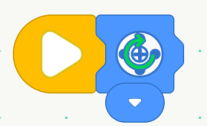
When the program starts, the motor rotates clockwise.
When Gyroscope Sensor ()

Executes the following blocks when the gyroscope sensor tilts to a specified position.
Example:
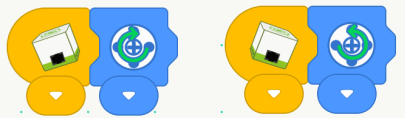
When the gyro sensor tilts left, the motor rotates clockwise; when it tilts right, the motor rotates counterclockwise.
When Gesture Sensor Detects ()

Executes the following blocks when the gesture sensor detects the specified gesture.
Example:

When the gesture sensor detects a “swipe left” gesture, the motor rotates clockwise.
When Encoder Sensor ()

Executes the following blocks when the encoder sensor detects a specified action.
Example:
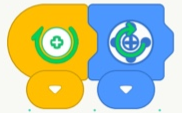
When the encoder sensor rotates clockwise, the motor rotates clockwise.
When Sound Sensor Detectes ()

Executes the following blocks when the sound sensor detects sound levels above 80.
Example:
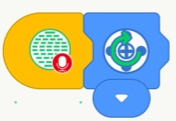
When the sound sensor detects a sound, the motor rotates clockwise.
When Distance Sensor Detects ()

Executes the following blocks when the distance sensor detects a specified range (close: n ≤ 5; medium: 5 < n ≤ 10; far: n > 10).
Example:

When the distance sensor detects a close range, the motor rotates clockwise.
When Button () is Pressed

Executes the following blocks when the specified button on the remote control is pressed.
Example:

When the “Up” button is pressed, the motor rotates clockwise.
Blue (Motor Category)
Set Motor Speed to ()

Sets the motor speed to the specified value (this block does not directly control motor movement).
Example:

When the program starts, set the motor speed to high, and the motor rotates clockwise.
Motor () Rotates Clockwise

Controls the selected port motor to rotate clockwise; if no port is selected, all ports are used by default.
Example:

When the program starts, the motor rotates clockwise.
Motor () Rotates Counterclockwise

Controls the selected port motor to rotate counterclockwise; if no port is selected, all ports are used by default.
Example:

When the program starts, the motor rotates counterclockwise.
Motor () Stops Rotating
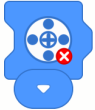
Stops the motor at the selected port; all ports are used by default if none are selected.
Example:
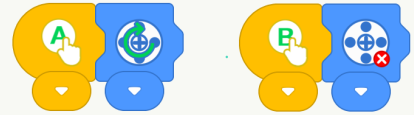
When the “A” button is pressed, the motor rotates clockwise; when the “B” button is pressed, the motor stops.
Move Forward

Controls the robot to move forward (requires two motors: left motor connected to Port 1, right motor connected to Port 2).
Example:

When the program starts, the robot moves forward.
Move Backward

Controls the robot to move backward (requires two motors: left motor connected to Port 1, right motor connected to Port 2).
Example:

When the program starts, the robot moves backward.
Turn Left

Controls the robot to turn left (requires two motors: left motor connected to Port 1, right motor connected to Port 2).
Example:

When the program starts, the robot turns left.
Turn Right

Controls the robot to turn right (requires two motors: left motor connected to Port 1, right motor connected to Port 2).
Example:

When the program starts, the robot turns right.
Stop

Stops the robot’s movement.
Example:
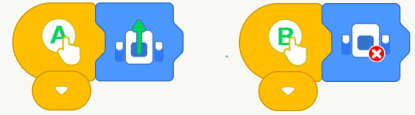
When the “A” button is pressed, the robot moves forward; when the “B” button is pressed, the robot stops.
Purple (Lighting Category)
Set Touch LED Sensor to Color ()

Sets the touch LED sensor to the selected color.
Example:
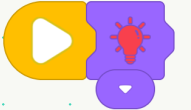
When the program starts, the touch LED sensor lights up red.
Orange (Control Category)
Wait () Seconds
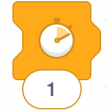
Waits for the specified amount of time before executing the following blocks.
Example:

When the program starts, wait 1 second, then the motor rotates clockwise.
Repeat () Times
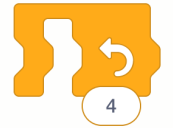
Repeats the enclosed program for the specified number of times (default is 4).
Example:
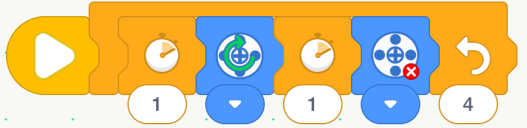
When the program starts, wait 1 second, the motor rotates clockwise, wait 1 second again, and the motor stops. Repeat 4 times.
Repeat Continuously

Continuously repeats the enclosed program.
Example:
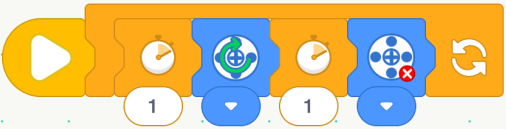
When the program starts, wait 1 second, the motor rotates clockwise, wait 1 second again, and the motor stops. Repeat infinitely.